In the ever-evolving world of online gaming, securing your account is more crucial than ever. For Roblox players, understanding how to verify your account is not just a recommendation it is a necessity for a safer and more enjoyable experience. This guide dives deep into the process of Roblox account verification covering everything from email and phone number verification to age verification and two-step authentication. Discover why these steps are vital for protecting your digital assets preventing unauthorized access and unlocking exclusive features. We will explore the benefits for busy gamers who balance their virtual adventures with real-life responsibilities ensuring peace of mind without hassle. Learn the simple steps to fortify your Roblox presence and navigate its expansive universe with confidence. Stay ahead of potential security issues and enhance your gaming journey today. This comprehensive resource is designed for gamers seeking practical solutions and reliable information to keep their Roblox experience secure and fun.
How do I know if my Roblox account is already verified?
You can quickly check your verification status by logging into your Roblox account and navigating to the 'Settings' section. Under 'Account Info' or 'Security,' you will see indicators next to your email address, phone number, and age verification status. A green checkmark or 'Verified' label typically confirms that the specific detail has been successfully authenticated by Roblox. This gives you an immediate overview of your account's security posture and what steps, if any, still need to be completed.
Why does Roblox ask for age verification beyond just email or phone?
Roblox requests age verification, typically through an ID scan, to comply with global online safety regulations and to offer age-appropriate experiences and features. While email and phone verify contact methods, age verification confirms your actual birthdate, which is essential for enabling features like spatial voice chat for users 13 and older, or restricting access to content not suitable for younger players. It helps create a safer, more tailored environment for all users based on their genuine age.
Can I still play Roblox without verifying my account?
Yes, you can still play Roblox and access many of its core features without a fully verified account. However, an unverified account will have significant limitations. You won't be able to use features like voice chat, certain age-restricted experiences will be inaccessible, and account recovery options will be severely limited, making your account more vulnerable to loss or compromise. It's strongly recommended to verify for a complete and secure experience.
What specific information is needed for Roblox age verification?
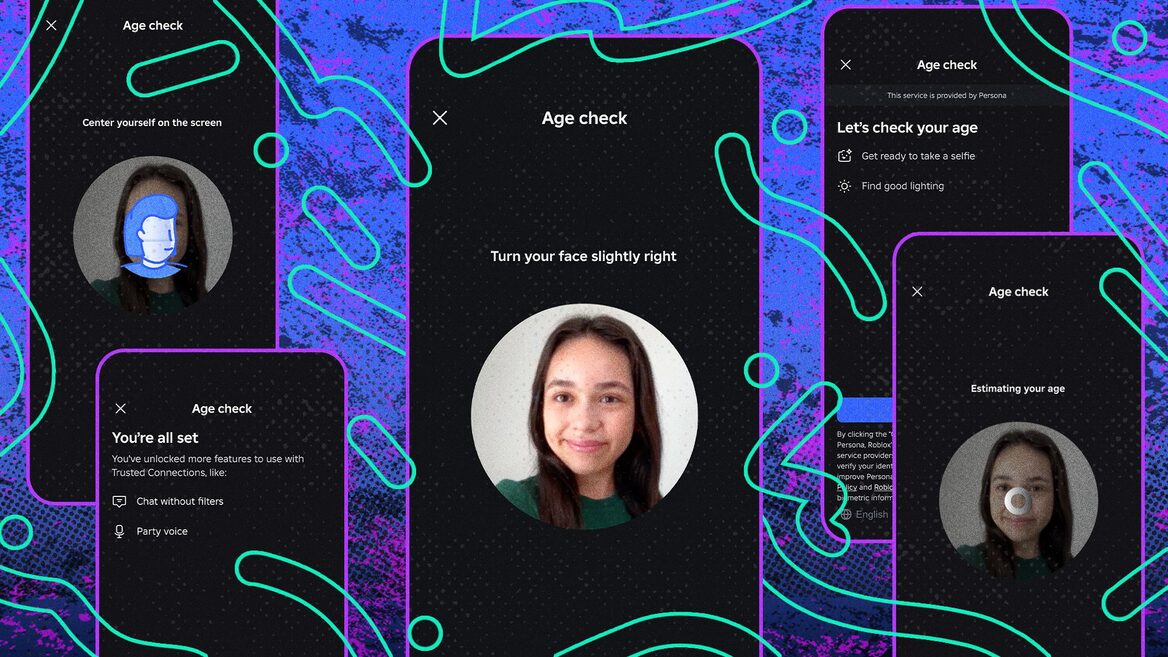
For Roblox age verification, you will typically need a valid, government-issued photo ID such as a driver's license, passport, or state ID. The process involves taking a photo of your ID and a live selfie through a secure third-party service integrated with Roblox. This service verifies the authenticity of your ID and matches your face to the photo, confirming your age without storing your sensitive ID information on Roblox's servers.
Is my personal data safe during the Roblox verification process?
Roblox emphasizes user privacy and security during verification. For age verification, they partner with third-party identity verification services that are designed to be privacy-centric. These services typically use encrypted connections and advanced technology to verify your ID without retaining sensitive documents or facial scan data after the verification is complete. Email and phone verifications use standard secure protocols to confirm ownership without exposing personal information.
How does verifying my phone number enhance Roblox account security?
Verifying your phone number significantly boosts your Roblox account's security by adding an extra layer of protection. It acts as a reliable recovery method if you lose access to your email or password, allowing you to regain control of your account. More importantly, it enables Two-Step Verification (2SV), which requires a code sent to your phone for every new login, making it incredibly difficult for unauthorized users to access your account even if they know your password.
What are the main risks of not verifying my Roblox account?
The primary risks of not verifying your Roblox account include heightened vulnerability to account hijacking, difficulty in recovering a lost or stolen account, and restricted access to key features. Without verification, your account is an easier target for malicious actors, potentially leading to loss of Robux, valuable in-game items, and creative progress. Additionally, you miss out on social features like voice chat and age-appropriate content, diminishing your overall Roblox experience.
As busy gamers, we know the grind of balancing work, family, and that precious time we carve out for our digital worlds. Whether you're building elaborate experiences in Roblox, unwinding with friends in a cozy game, or exploring vast new universes, your gaming account is a valuable part of your personal relaxation and social life. The last thing any of us wants is to log in and find our progress gone, our currency stolen, or worse, our account completely hijacked. This month, online security remains a top concern, especially with 87% of US gamers regularly dedicating 10 or more hours a week to their passion, often across mobile and PC platforms. This makes safeguarding your Roblox presence not just a good idea, but an essential part of a worry-free gaming experience.
Understanding how to verify your Roblox account is your first and most critical line of defense. It's about more than just keeping bad actors out; it's about unlocking full platform features, ensuring your interactions are legitimate, and even gaining access to age-restricted content that enhances your creative and social play. In this comprehensive guide, we'll walk you through every step to secure your Roblox account, from simple email and phone number verification to advanced two-step authentication and crucial age verification. We'll show you why these steps matter for busy adults who value both their digital assets and their limited gaming time. Let's dive in and fortify your Roblox world together, ensuring your virtual escapes remain just that escapes, not sources of stress.
What Does It Mean to Verify Your Roblox Account?
Verifying your Roblox account means confirming ownership and legitimacy through various methods, primarily your email address and phone number. This process essentially links real-world contact information to your virtual identity within the Roblox ecosystem. Beyond basic contact verification, Roblox also offers age verification, which uses ID scanning to confirm a user's age. These steps collectively create a more secure and trustworthy environment for all players, aligning with current online safety trends where platforms are increasingly requiring stronger identity validation. For gamers who enjoy social interactions and creating experiences, this foundational security measure ensures your contributions and connections are protected.
Why is it Important to Verify Your Roblox Account?
Verifying your Roblox account is paramount for several reasons, especially in today's digital landscape. Firstly, it drastically enhances your account security, making it significantly harder for unauthorized users to gain access. With the rise of phishing attempts and account compromises, a verified account acts as a strong deterrent, protecting your Robux, in-game items, and painstakingly built creations. Secondly, verification unlocks essential platform features, such as the ability to participate in voice chat, access specific age-restricted experiences, and even some trading functionalities. For parents who game alongside their children, or busy adults managing family accounts, these verifications also aid in implementing robust parental controls. It's about safeguarding your digital time investment and ensuring a smooth, interruption-free gaming experience.
How Do I Verify My Email Address on Roblox?
Verifying your email address on Roblox is a straightforward process crucial for account recovery and essential communications. Here's how busy gamers can quickly get it done:
- Log In to Roblox: Access your account on the Roblox website or app.
- Go to Settings: Navigate to the 'Settings' page. You'll usually find this by clicking the gear icon in the top right corner.
- Add Email: Under the 'Account Info' tab, locate the 'Email Address' field. If it's not already there, add your preferred email.
- Click 'Verify Email': Once your email is entered, a 'Verify Email' button will appear next to it. Click this.
- Check Your Inbox: Roblox will send a verification email to the address you provided. Open this email.
- Click the Verification Link: Inside the email, click the 'Verify Email' button or link. This will redirect you back to Roblox, confirming your email is verified.
This simple step ensures you can reset your password easily if forgotten and receive important security notifications, minimizing downtime and frustration for your precious gaming moments.
How Do I Verify My Phone Number on Roblox?
Adding and verifying your phone number provides an additional layer of security and convenience, acting as a backup recovery method and enabling two-step verification. It’s an increasingly common security practice across major online platforms.
- Access Account Settings: Log into your Roblox account and go to the 'Settings' page.
- Navigate to Account Info: Under the 'Account Info' tab, find the 'Phone Number' section.
- Add Phone Number: Enter your mobile phone number.
- Click 'Verify Phone': A 'Verify Phone' button will appear. Click it to proceed.
- Enter Verification Code: Roblox will send a six-digit verification code via SMS to your phone. Enter this code into the prompt on the Roblox website or app.
- Confirmation: Once the code is correctly entered, your phone number will be verified.
Having a verified phone number is especially useful for quickly recovering access to your account if you're locked out, which is a common pain point for gamers managing multiple accounts or taking breaks. This quick setup ensures you spend more time playing and less time troubleshooting.
What is Roblox Age Verification and Why Should I Do It?
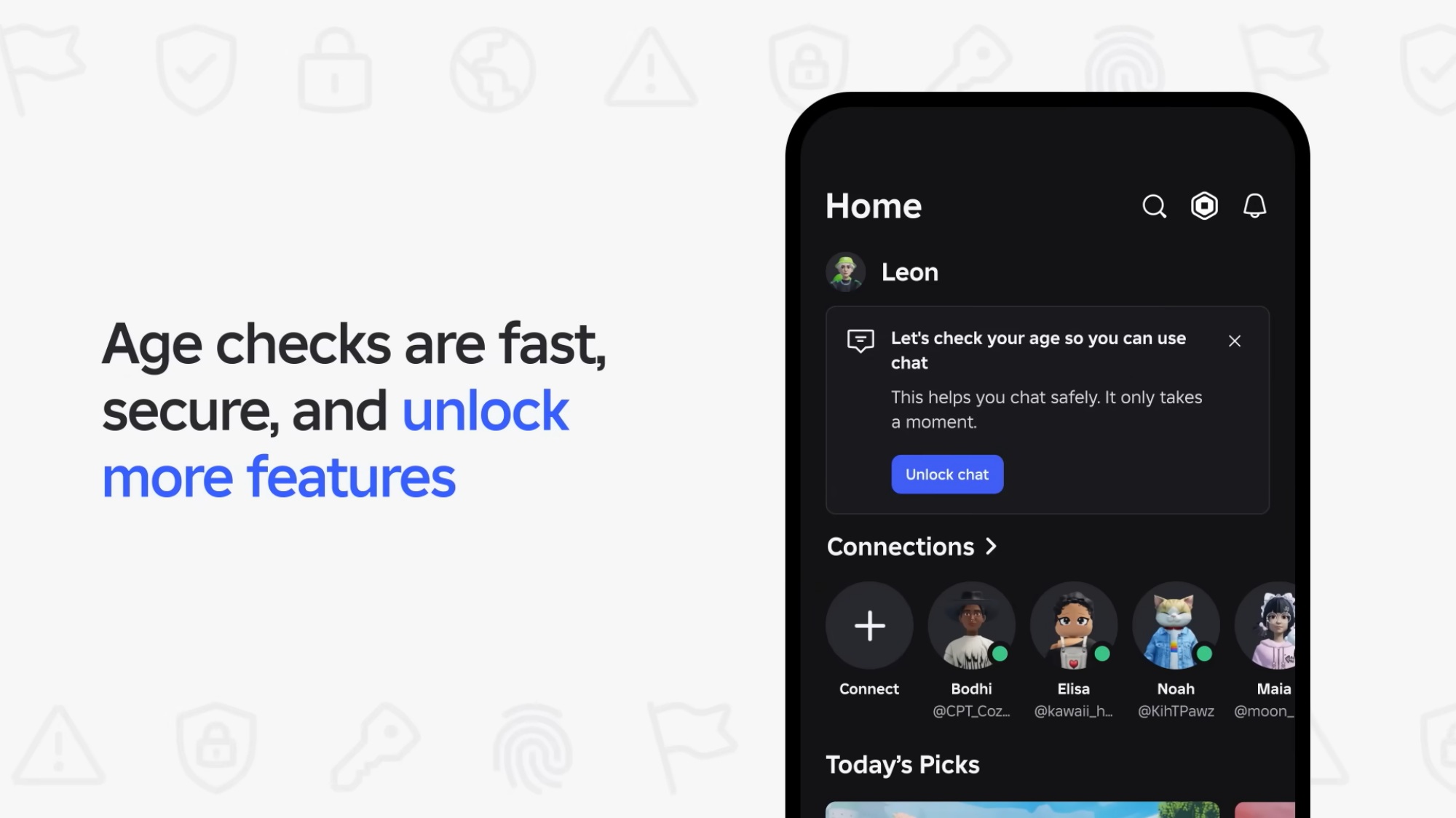
Roblox age verification is a process where users confirm their actual age using an official ID, such as a driver's license or passport. This is crucial for unlocking a more appropriate and feature-rich experience on the platform. Roblox uses a third-party service to securely verify your age without storing your ID data. For adult gamers, this verification is particularly beneficial:
- Access to Voice Chat: With age verification, players aged 13 and older can access Roblox's spatial voice chat, enhancing social play and interaction within experiences – a feature highly valued by the 60% of US gamers who prioritize social aspects.
- Exclusive Experiences: Some user-created games and experiences are designed for specific age groups and require age verification to access, providing more mature or tailored content.
- Enhanced Trust and Safety: Knowing users are verified contributes to a safer environment, especially when engaging in multiplayer interactions or user-generated content. This aligns with trends for greater online accountability.
It allows for a more tailored and secure social gaming experience, giving you greater control over your interactions and the content you engage with on Roblox.
How Do I Set Up Two-Step Verification (2SV) for My Roblox Account?
Two-Step Verification, often called 2SV or 2FA, adds a vital layer of security to your Roblox account by requiring a second verification step whenever you log in from an unrecognized device. Even if someone obtains your password, they can't access your account without your verified email or phone. This is a must-have for any serious gamer concerned about digital security, given the high rate of online account breaches across platforms.
- Ensure Email/Phone is Verified: Before enabling 2SV, make sure you have a verified email address or phone number linked to your Roblox account. This is the primary method for receiving verification codes.
- Go to Security Settings: Log in to Roblox and navigate to 'Settings,' then select the 'Security' tab.
- Toggle 2SV On: Find the 'Two-Step Verification' option and toggle it to the 'On' position.
- Choose Verification Method: You'll be prompted to select how you want to receive your verification codes – either via your verified email or phone number.
- Enter Code: A code will be sent to your chosen method. Enter this code to confirm and activate 2SV.
- Save Recovery Codes: Roblox will provide a list of one-time recovery codes. It is critical to save these codes in a secure place, as they are your only way to regain access if you lose access to your primary verification method.
Implementing 2SV takes minutes but provides peace of mind, allowing you to focus on building and playing without constantly worrying about account security.
Are There Any Specific Benefits to a Verified Roblox Account for Adult Gamers?
Absolutely. While Roblox is popular with younger audiences, a significant portion of its user base includes adults who enjoy the platform for creativity, social interaction, and even professional development. For this demographic, a verified account offers distinct advantages:
- Enhanced Social Interactions: With age verification, adult gamers can access voice chat, enabling more sophisticated and natural communication within experiences. This is vital for collaborative projects or simply unwinding with friends after a long day.
- Personalized Content Access: Age verification unlocks content and experiences specifically rated for older players, providing a more tailored and engaging environment. This helps in discovering games that align better with adult preferences, moving beyond general public experiences.
- Protecting Digital Investments: Many adult gamers invest Robux in game passes, unique items, or even developing their own experiences. Verification, especially 2SV, protects these financial and creative investments from potential theft.
- Parental Peace of Mind: For adults who also manage their children's Roblox accounts, understanding and utilizing verification features provides robust parental controls, ensuring a safer online space for younger players while maintaining their own secure profile.
- Legitimacy in Creator Economy: If you're an adult developer or content creator on Roblox, a verified account adds a layer of professionalism and trust when interacting with other creators or managing your published experiences.
These benefits translate directly into a more secure, richer, and more aligned gaming experience for adults navigating Roblox.
What are Common Issues During the Roblox Verification Process and How Can I Troubleshoot Them?
Even with straightforward processes, glitches can happen. Here are common issues users face when trying to verify a Roblox account and practical troubleshooting steps:
- Verification Email/SMS Not Arriving: This is frequent.
- Check Spam/Junk Folder: Emails often land here.
- Verify Correct Information: Double-check email/phone number entered is correct.
- Wait a Few Minutes: Delays can occur.
- Resend Code/Email: Option usually appears after a short cooldown.
- Check SMS Blocker/Filters: Ensure your phone isn't blocking unknown senders.
- Verification Link Expired: Links are time-sensitive.
- Request New Link: Go back to Roblox settings and request a new verification email.
- Lost Access to Old Email/Phone: If you no longer have access to linked contact info.
- Contact Roblox Support: Critical step. Provide account info (usernames, purchase history) to prove ownership. Patience is key.
- ID Verification Failure (Age Verification):
- Ensure Clear Photo: ID photo must be well-lit, clear, readable.
- Use Supported ID Type: Confirm you are using a government-issued ID.
- Check for Glare: Avoid glare during photo process.
- Try Again Later: Temporary system issues can occur.
Most issues resolve with patience and careful checking. For persistent problems, Roblox Support is your best resource; having account details handy speeds up resolution.
How Often Should I Review My Roblox Account Security Settings?
For optimal security and peace of mind, adult gamers should aim to review their Roblox account security settings at least once every six months, or whenever there's a significant change in their digital habits or the platform itself. This proactive approach helps in several ways:
- Stay Ahead of Threats: The online security landscape is constantly evolving. Regular reviews ensure your settings are up-to-date against new phishing tactics or vulnerabilities.
- Confirm Contact Information: Life changes, and so do email addresses or phone numbers. A quick check ensures your recovery options are always current.
- Manage Authorized Devices: You might have logged into Roblox on a friend's PC or a temporary device. Regularly checking your logged-in devices and removing unfamiliar or old ones adds a layer of protection.
- Review Parental Controls (if applicable): For those managing family accounts, ensuring parental controls and privacy settings are still appropriate for younger players is crucial.
- Enable New Features: Roblox, like other major platforms, frequently rolls out new security or privacy features. Regular checks ensure you leverage these enhancements as soon as they become available, keeping your experience as secure as possible.
Think of it like routine maintenance for your gaming rig – a little regular effort prevents bigger problems down the line, allowing you to maximize your enjoyment without security worries.
Can I Verify My Roblox Account on Mobile Devices and PCs?
Yes, absolutely! Roblox is a highly accessible platform, and its account verification processes are designed to be user-friendly across multiple devices. Whether you primarily game on a mobile phone (which is the preferred platform for many casual gamers, as mobile gaming continues its dominance in 2026), a tablet, or a traditional PC, you can easily complete all verification steps.
- Roblox Mobile App: The official Roblox app for iOS and Android allows you to navigate to your account settings and perform email, phone, and even age verification directly within the application. The interface is intuitive and mirrors the desktop experience for these core functions.
- Roblox Website (Desktop/Browser): If you prefer using a web browser on your PC or Mac, you can log into the Roblox website and access your account settings there. All verification options are readily available and function identically to the mobile app.
The flexibility to verify your Roblox account on your preferred device means you can take care of these essential security measures whenever and wherever it's most convenient, fitting seamlessly into a busy schedule. This cross-platform compatibility ensures that no matter how you choose to play, your account remains secure and fully functional.
Securing your Roblox account through verification is a small investment of time that yields significant returns in peace of mind, enhanced features, and overall enjoyment. From basic email and phone verification to robust two-step authentication and age verification, each step builds a stronger defense around your digital world. For adult gamers balancing life's demands, these measures ensure that your precious gaming moments remain stress-free and truly your own, protecting your progress, purchases, and social connections. Embrace these simple yet powerful tools to keep your Roblox experience safe, fun, and fully optimized.
What's your biggest gaming challenge when it comes to account security or balancing your gaming life? Comment below and let's discuss!
Is Roblox age verification mandatory?
No, Roblox age verification is not mandatory for basic account functionality. However, it is required to access certain features like spatial voice chat and specific age-restricted experiences, offering an enhanced and tailored platform interaction. It's highly recommended for users 13+ to unlock the full social potential of the platform.
Can I change my verified email or phone number?
Yes, you can update your verified email address or phone number in your Roblox account settings. You'll need to verify the new contact information through a similar process of receiving and entering a code or clicking a verification link. Always ensure your contact details are current for account recovery.
What happens if I lose my 2SV recovery codes?
Losing your 2SV recovery codes can be problematic if you also lose access to your primary verification method (email/phone). Without them, regaining access might require contacting Roblox Support and undergoing an extensive account ownership verification process, which can be time-consuming. Always store them securely.
Does Roblox account verification cost money?
No, all forms of Roblox account verification, including email, phone number, and age verification, are completely free. Roblox provides these security and feature-unlocking services at no additional charge to enhance user safety and experience on the platform.
How long does Roblox age verification take?
The age verification process itself is typically very quick, often completing within minutes once you've submitted your ID photos. The automated system can usually process and confirm your age swiftly, allowing you to almost immediately access age-verified features on Roblox.
Enhanced Security for Roblox Accounts Prevents Unauthorized Access Unlocks Age Restricted Experiences Enables Two Step Verification Required for Certain Features Protects In Game Purchases and Items Essential for Parental Controls Simplified Verification Steps for Email and Phone Number Importance of Age Verification for Compliance Benefits for Gamers Managing Life and Play
35


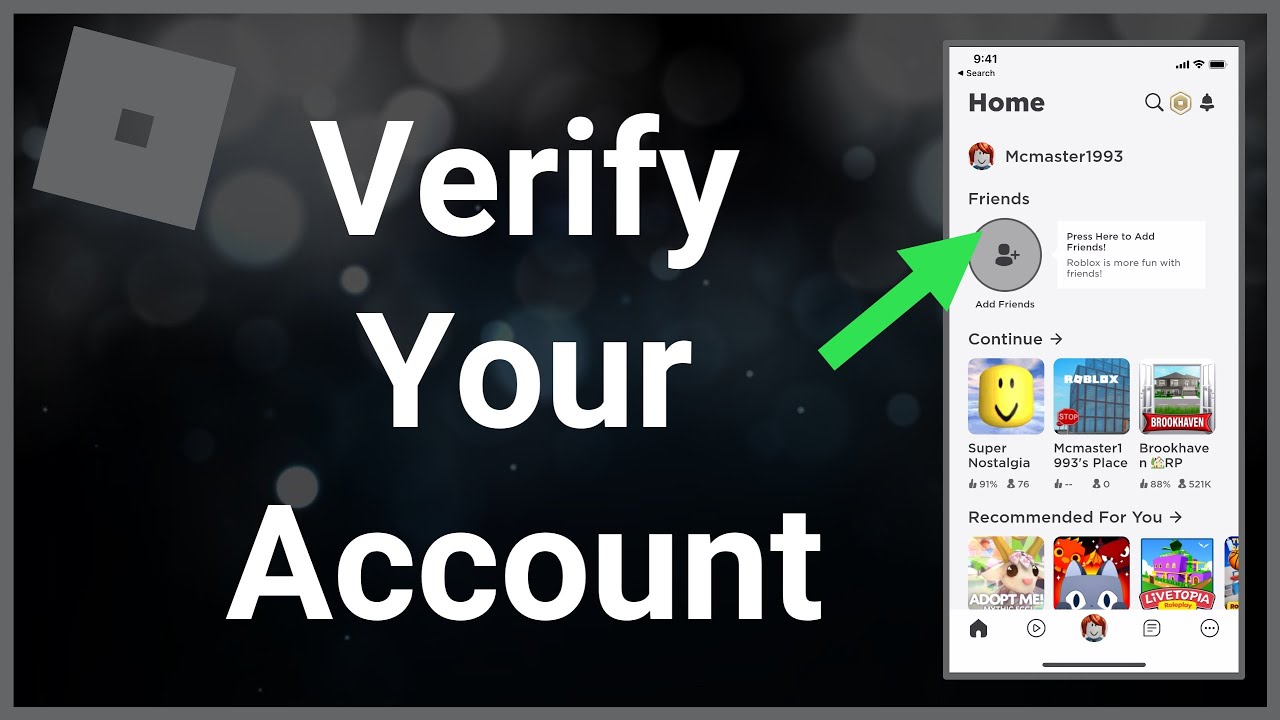
Enter The 6 Digit Code Then Click The Continue Button Verify Phone Dialog . Opsi Untuk Usia Dengan Selfie Atau ID Verify With ID . Option To Verify Age With Selfie Or ID Verify Birthday . Roblox 2026 How Can Players Get Verified 14414001 13 . How To Verify Your Roblox Account YouTube

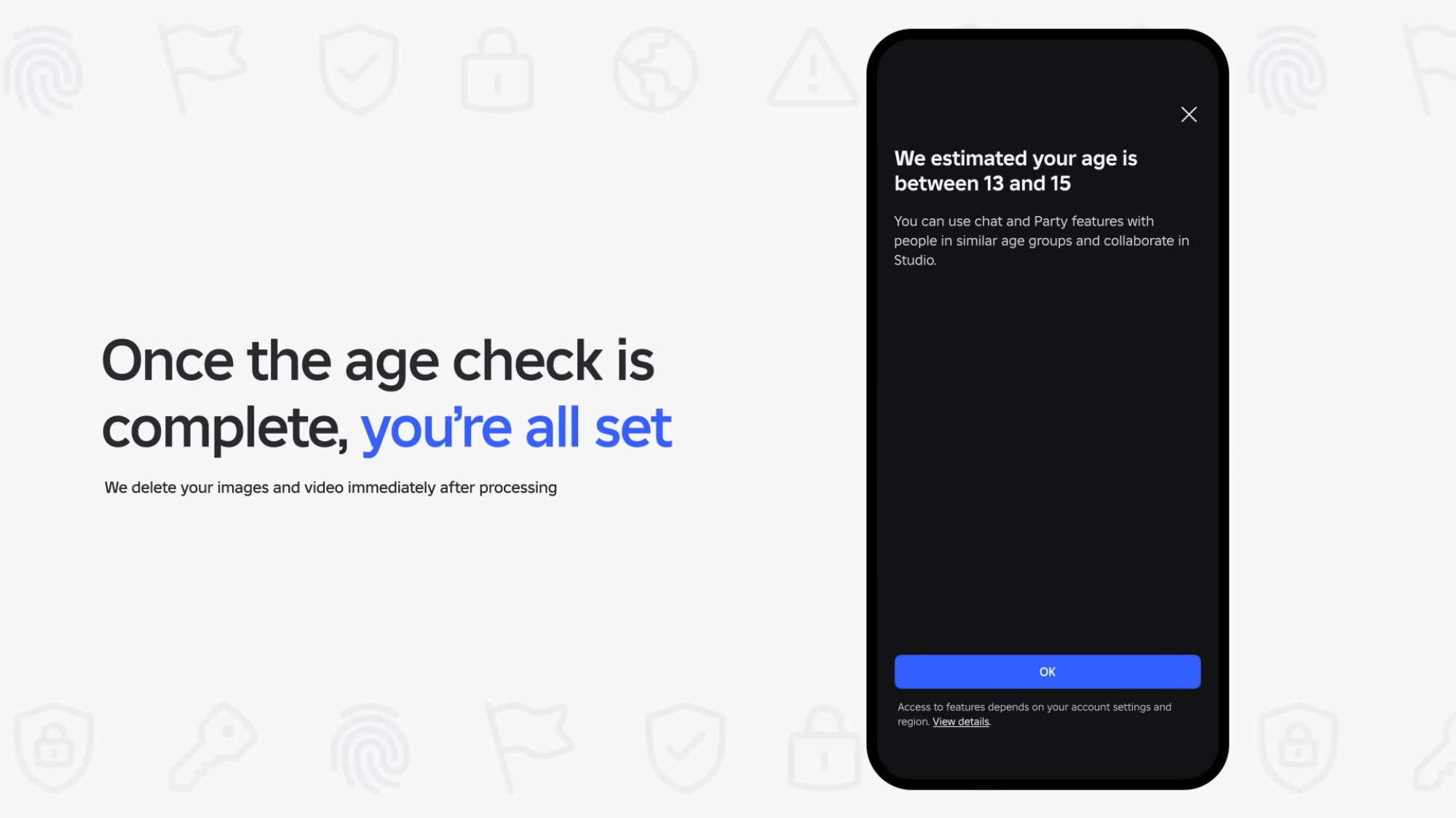

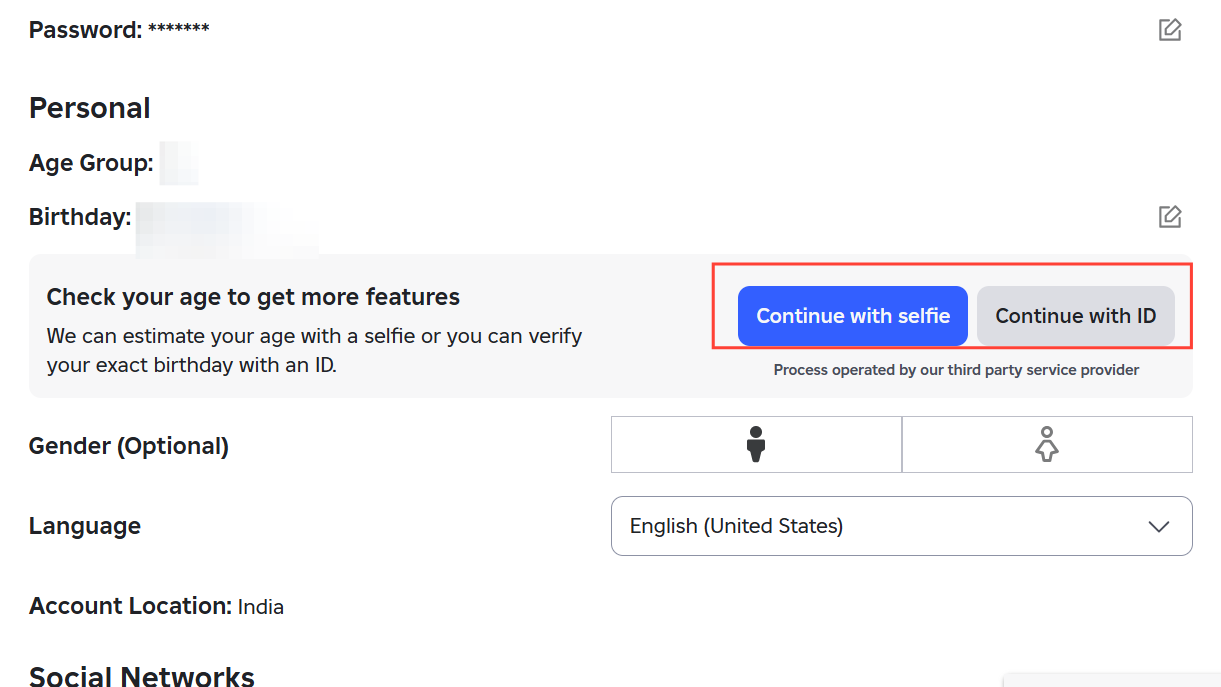
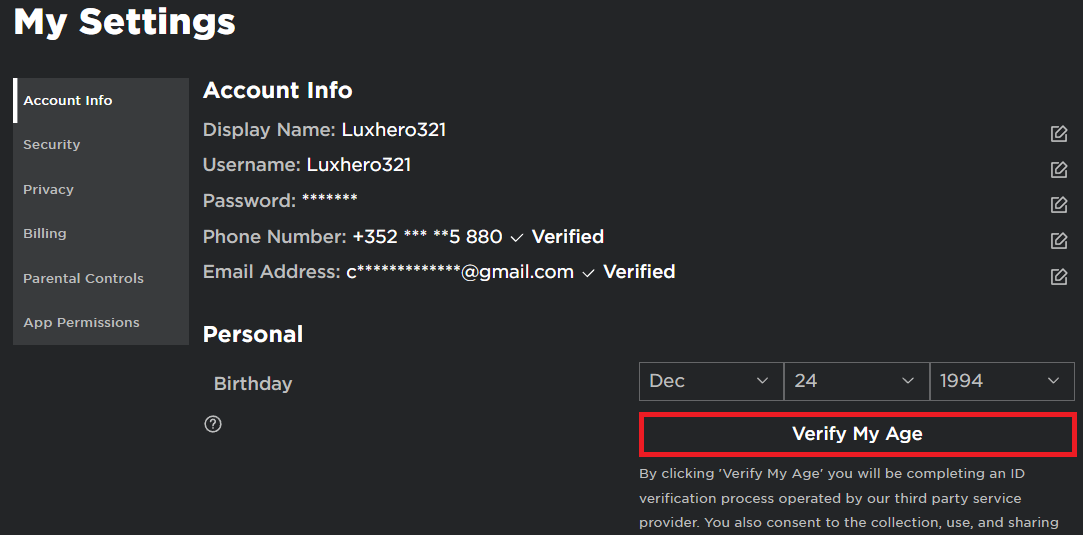
How To Get Verified On Roblox In Depth Guide V4 460px 14414001 2 . Roblox Erzielt H Chste Je Erreichte Erl Se Von Creatoren Roblox Age Roll Out 3 . Roblox 2026 How Can Players Get Verified . Roblox Age Checks How Re Really Works And When You Re Stuck Image 781 1 . Roblox 2026 How Can Players Get Verified 2 Verify Age


Kako Dobiti Na Robloxu Sve To Trebate Znati 5e035e71 D664 4865 A22c. Here S How Roblox S Age Checks Work TechCrunch EN Age Check Flow 1 . Dept Comms Minister Banning Online Games To Resolve Child Roblox Age Roll Out 1 . How To Get Verified On Roblox Pro Game Guides Roblox Verified Badge Featured Image . Account Roblox Creator Hub Account Settings


Roblox 2026 How Can Players Get Verified V4 460px 14414001 4 . Optional Restart Studio To Validate Your New Age Status Phone Verified . How To Verify Your Age On Roblox In 2022 Easy Guide Beebom Roblox Age Box . I Can T Access My Roblox Account Due To Broken Two Step On I Cant Access My Roblox Account Due To Broken Two Step On Android 1 768x768 . Roblox Requires Users To Pass Age To Use Chat Dev Ua



How To Find Your Roblox Password For 2026 . Ultimate Roblox Age Guide March 2026 Safety First Roblox Age Guide . How To Message On Roblox 2026 A Quick Guide . Account Still Terminated After Platform . Want A Free Roblox Account What You Need To Know Now


Roblox Age Processes TikTok Img. Starting Today Completing An Age Check Or ID Is Now G . Account Terminated For The Name Jehad128 Roblox Application And . Need A Second Roblox Account How Do You Make One Large. Roblox Age What Parents Need To Know



Verifyemail . How To Create A Roblox Account In 2026 What You Need Roblox Login How To Create A New Account . Why Cant I Login To Roblox Youtube Logging In With A Passkey . What Does A Roblox Verified Emoji Mean In 2026 958da 1920 . Lost Roblox Password How To Find Yours In 2026